Daily work
The inbox: see every chat and take over
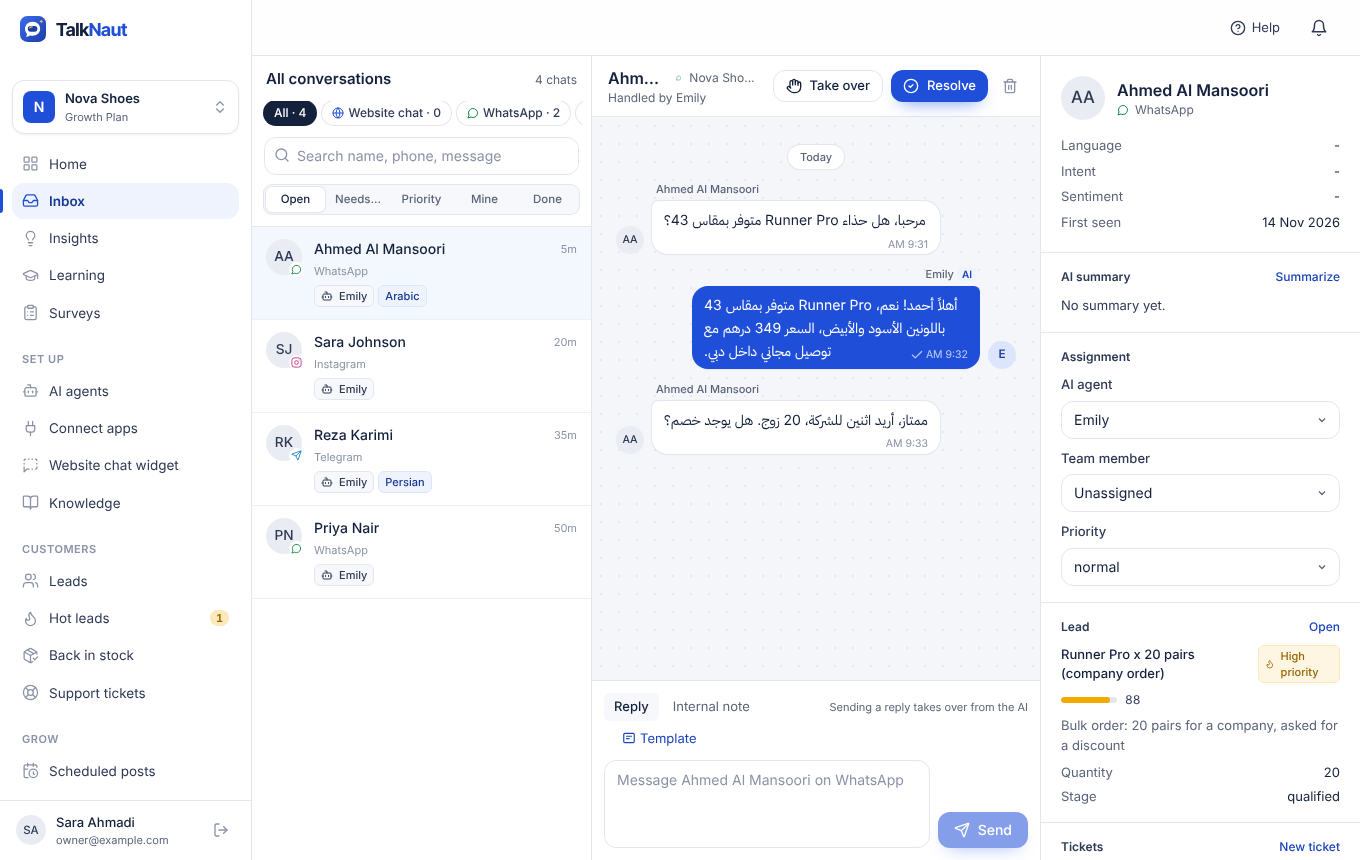
All apps in one place. Read along, reply yourself, hand the chat back to the agent, and see what the customer wants.
A quick tour
talknaut.com/app/inbox
 123
Take over a chat
Press Take over, or just type and send: sending a reply takes over from the AI, so it never talks over you. Press Return to AI when you’re done. Replies you send from the WhatsApp Business app or Telegram on your phone pause the agent the same way.
Common problems
Something not working? Find your message below.
A chat is missing
Check the filters at the top (app, Assigned, Unassigned). Chats from an app appear only after it’s connected; old chats from before connecting appear only if you shared history (WhatsApp).
Notifications don’t arrive
Allow notifications for talknaut.com in your browser, and check Account → Notifications. Hot lead emails go to the address in your account.
Related guides
Hot leads and insightsCustomers ready to buy are flagged and emailed to you. Insights show what people want, what’s missing and where sales are lost.Languages, chat teams and transfersAgents answer in the customer’s language, hand over to a teammate who speaks it, and transfer chats to specialists or a human.Listen-only modeTalkNaut reads every chat but never replies. You get the insights, agents learn from your team, and you switch on answering when ready.