Connect Instagram
Switch to a professional account, log in with Instagram, and your agent answers your DMs.
- An Instagram professional account (Business or Creator). Switching is free and takes a minute
- The Instagram username and password (or the phone with the app logged in)
First: make it a professional account
Choose Business (or Creator). It's free and you keep your followers.
Lets connected apps like TalkNaut read and answer your DMs
If DMs don't reach TalkNaut, this switch is usually off.
In the Instagram app: Profile → ☰ → Settings and activity → Account type and tools → Switch to professional account. Then turn on Allow access to messages (Settings → Messages and story replies → Message requests → Connected tools).
Step by step
- 1
Open Connect apps → Instagram
Read the checklist, then click Log in with Instagram.
talknaut.com/app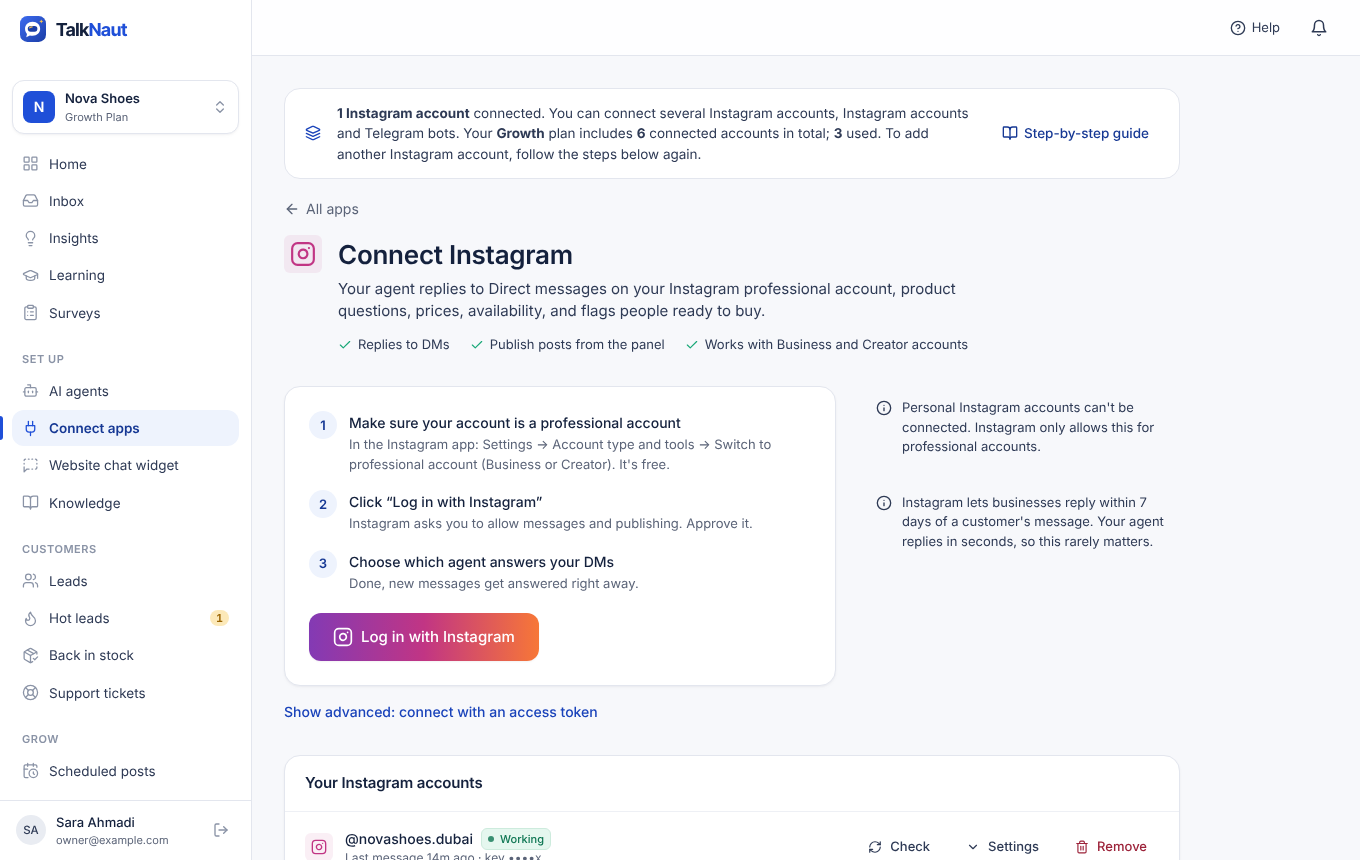
- 2
Log in and allow
Instagram opens. Log in to the account you want to connect and press Allow on every permission. Saying no to messages means the agent can’t read or answer DMs.
- 3
Choose who answers
Pick the agent or chat team. Send a DM from another account to test.
Connect another Instagram account
Instagram logs you into the account that’s already open in your browser. To add a different one:
- Open instagram.com in the same browser and log out (or switch account).
- Back in TalkNaut, click Log in with Instagram again and log in to the other account.
Each account counts as one connected account on your plan.
Common problems
Something not working? Find your message below.