Connect your apps
Connect WhatsApp with a new number
Use a number that isn’t on WhatsApp yet. Facebook verifies it with a code by SMS or call; no phone app needed afterwards.
Before you start
- A phone number that can receive an SMS or a call and is NOT on WhatsApp or WhatsApp Business
- A Facebook account
- Your business name as you want customers to see it (Meta checks the display name)
Step by step
- 1
Choose “I want to use a new number for the business”
Then click Connect with Facebook.
talknaut.com/app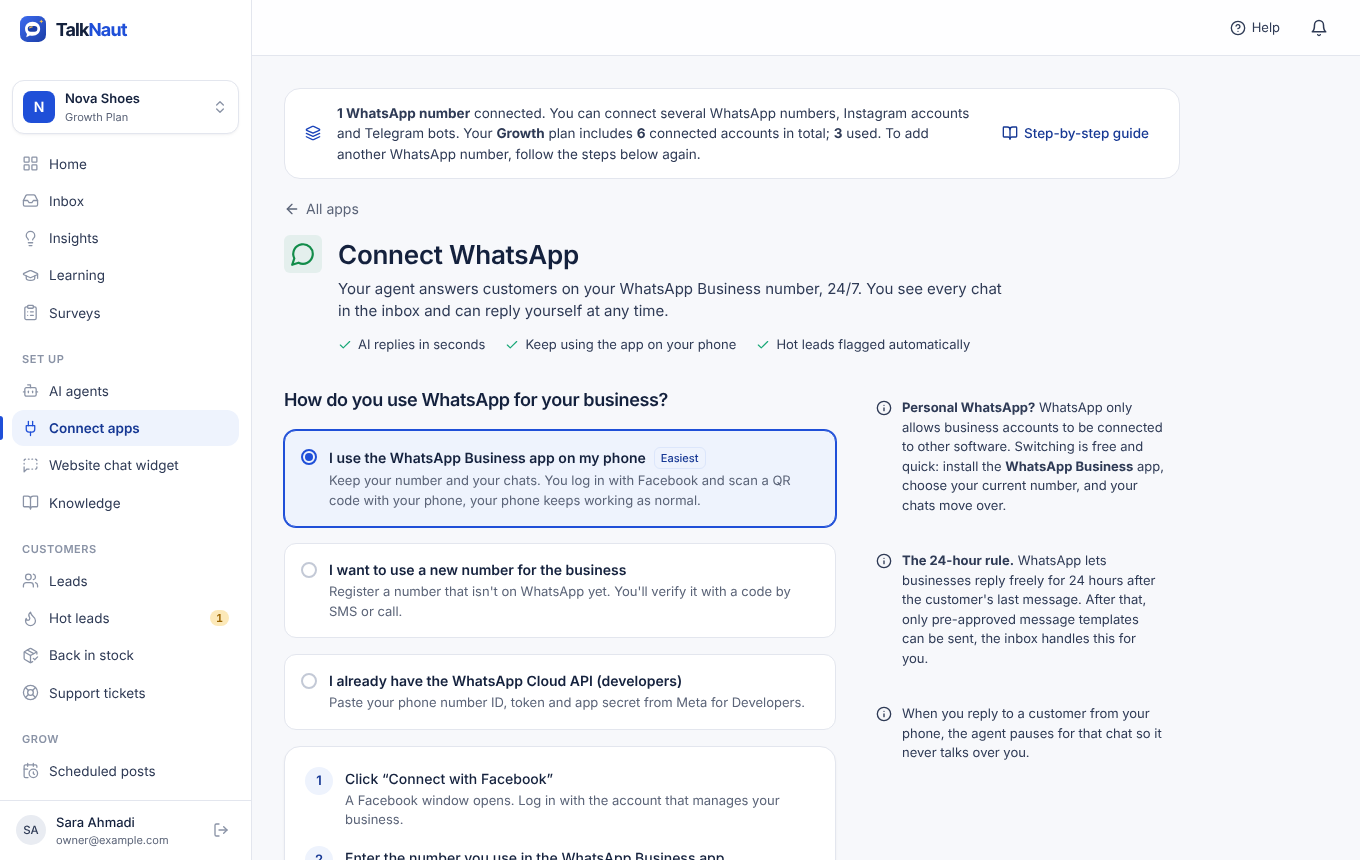 1
- 2
Log in, choose your business, add the number
Pick Enter a new phone number, type it with the country code, enter your display name (usually your business name) and choose SMS or Voice call.
facebook.comMeta⇄TalkNautSelect your business portfolioNova ShoesUse your existing business, or create one with your business name, country and website.
Nextfacebook.comMeta⇄TalkNautAdd your WhatsApp phone numberPhone numberEnter a new phone numberAE +97150 123 4567If this number is in the WhatsApp Business app, Facebook switches to the QR code automatically after you press Next.
BackNext - 3
Type the 6-digit code
Enter the code you receive and press Next, then Finish.
- 4
Pick who answers
Choose the agent or chat team. Done.
What’s different from the Business app option
- There’s no app on a phone: you and your team reply from the TalkNaut inbox (on a computer or phone browser).
- New numbers start with a daily limit on how many new people you can message first. It rises automatically as you use it well.
- The display name is reviewed by Meta. Until it’s approved, customers see the number.
Common problems
Something not working? Find your message below.
The code never arrives
Wait 2 minutes and choose Voice call instead. Landlines and many virtual numbers can’t receive SMS: voice works. Make sure the number isn’t on WhatsApp already.
“This phone number is already registered”
The number is on WhatsApp or WhatsApp Business. Either use the Business app option to keep it, or delete the WhatsApp account on that phone first (you’ll lose its chats).
My display name was rejected
Meta wants a name that matches your business, for example your shop or brand name as on your website. Change it in Meta Business Suite → WhatsApp accounts → Phone numbers.
Related guides
Connect WhatsApp (WhatsApp Business app)Keep your number, your chats and your phone. You log in with Facebook, scan a QR code and your agent answers next to you.Connect WhatsApp Cloud API (developers)Already have a Meta app with the WhatsApp Cloud API? Paste your phone number ID, access token and app secret.The inbox: see every chat and take overAll apps in one place. Read along, reply yourself, hand the chat back to the agent, and see what the customer wants.